Switching platforms is a bigger decision than it looks like from the outside. It’s not just picking a new tool — it’s migrating years of student data, retraining your whole counseling team, and betting that the new system will actually reduce work instead of just moving the same manual process into a different interface. That’s worth getting right the first time.
Whether you’re moving off a legacy system, replacing a patchwork of spreadsheets, or evaluating your first dedicated platform, here’s the framework worth working through before any contract gets signed — plus the specific questions to ask in a demo that most sales calls won’t volunteer answers to unprompted.

Start with the question that actually matters
Every platform in this category — Counsely included, alongside established names like Naviance, Scoir, SchooLinks, and MaiaLearning — will describe itself as saving counselors time. The question worth pressure-testing in a demo isn’t whether it can save time in theory. It’s: for the specific tasks eating your week right now, does this tool remove a step, or just move it somewhere else?
If your biggest time sink is manually cross-referencing student test scores against college admissions ranges, ask the sales rep to show you that exact workflow live — not a feature list slide, the actual click path. If it’s roster management across multiple counselors, ask them to import a real (anonymized) sample roster on the call. Vague answers here are the clearest signal of how the tool will actually feel in October.

The evaluation checklist
1. Does the college data stay current, and where does it come from? Ask directly what data source powers the college search and comparison features, and how often it updates. A platform pulling from the U.S. Department of Education’s College Scorecard on a defined refresh cycle is a very different claim than “our team maintains this manually” — ask which one you’re getting, and how you’d know if a number was stale.
2. How fast is roster setup, honestly? Every platform will say it supports bulk import. Ask to see a CSV/Excel import actually run during the demo, with your school’s real column structure, not a pre-formatted sample file the vendor prepared. This is the single fastest way to expose a clunky import process before you’re the one debugging it in August.
3. What does the student and family experience actually require? Does a student need to install an app? Create a separate account with its own password to manage? Get an email invitation that goes to spam half the time? For every extra step between “counselor sends invite” and “student is actually using the tool,” expect real adoption friction — especially with families who are already juggling six other school platforms.
4. How does it handle the gap between what the counselor recommends and what the student wants? This is a genuinely common failure mode with less mature tools: the counselor’s recommended list and the student’s own list live in two different places, and nobody notices the disconnect until an application deadline is missed. Ask specifically how the platform shows both lists side by side, and who can see what.
5. What’s the actual pricing structure — and what happens as your caseload grows? Per-student pricing, per-counselor pricing, and flat per-school pricing all behave very differently as a program scales. A price that looks reasonable for 200 students can get expensive fast under a per-seat model once enrollment grows or a new counselor joins. Ask for the exact pricing structure in writing, not just the number for your current headcount.
6. Is there a real trial, or just a scripted demo? A live demo shows you what a sales rep wants you to see. A trial with your own (or realistic sample) data shows you what actually happens when your team uses it. Prioritize platforms that offer a genuine trial period over ones that only offer scheduled demos — you’ll catch friction points in week two of real use that never show up in a 30-minute call.
7. What does migration actually involve? If you’re moving off an existing platform, ask exactly what happens to your historical data — past student records, saved lists, notes. “We can help with that” is not an answer; ask for the specific process and realistic timeline, and get it in writing if it affects your decision.
8. Who do you call when something breaks in November? Support quality is nearly impossible to evaluate from a sales call, so ask directly: what’s the support channel, what’s the typical response time during peak season (October–January, when every counseling platform’s support queue gets slammed), and can you talk to a current customer rather than just reading a testimonial.

Where Counsely fits into this
We built Counsely around a specific answer to the first question above: for the two tasks that eat the most counselor time, matching students to colleges based on their actual scores, and keeping a caseload’s worth of lists organized in one place instead of scattered spreadsheets, the platform is built to remove the manual step entirely rather than digitize it.
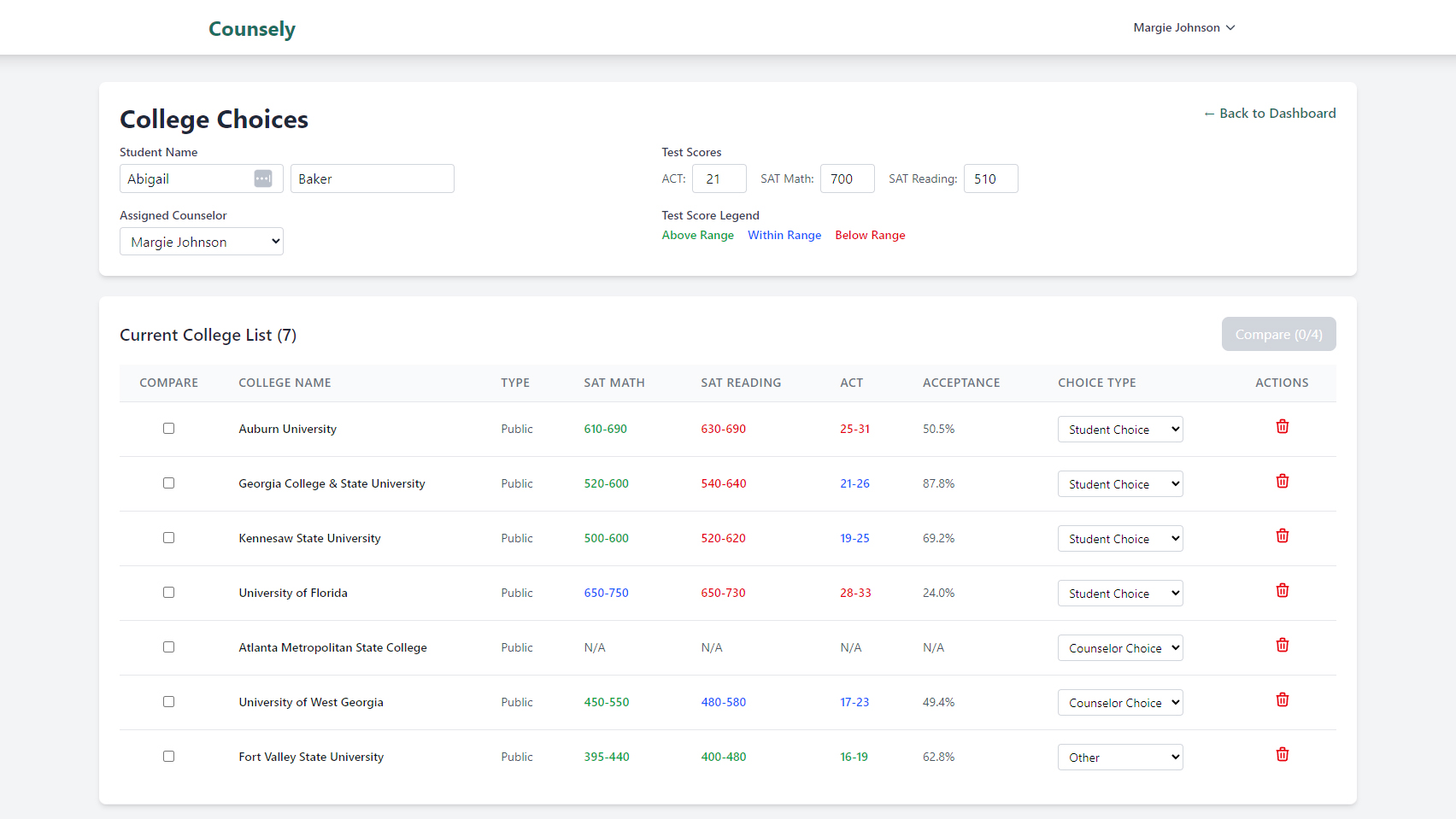
Specifically: college data pulled from the U.S. Department of Education’s College Scorecard across 6,400+ institutions, score-match filtering that surfaces reach/target/safety automatically from a student’s actual GPA and test scores, bulk CSV/Excel roster import, side-by-side comparison for up to four schools, and student collaboration links that don’t require an app install. students get an email invite, add their own picks, and see counselor recommendations in the same place. Pricing is flat per school ($24.95/month or $249/year) for unlimited students and counselors, so it doesn’t get more expensive as your caseload grows or your team adds a counselor.
That’s a claim worth testing against the checklist above rather than taking at face value, which is exactly what the trial is for.
Give it a try!
Start a free 30-day trial of Counsely and run your own roster and college search through the checklist above before you commit to anything. No scripted demo required — bring your own data and see what actually changes in your weekly workflow.